
Fixed-price Moodle upgrades to 5.3 LTS.
We upgrade self-hosted Moodle sites from 4.x or 5.0 to the current long-term support release on a staging clone first, with a plugin-by-plugin audit, a test report and a written rollback plan. The price is agreed before any work starts.
Standard upgrade $2,400Complex / rescue from $4,8002–3 weeks typical
Updated 6 October 2026 · Moodle 5.3 LTS released 5 October 2026
Moodle 5.0 stopped receiving security fixes on 5 October 2026, and Moodle 5.3 LTS (supported until 1 October 2029) is now the release to upgrade to. Sites on 4.4 or later can go straight to 5.3. Sites on 4.1–4.3 need two hops via 4.5 LTS, and sites on Oracle must move to PostgreSQL or MySQL first. UTSL does this at a fixed price: $2,400 for a standard single-site upgrade, from $4,800 for complex or rescue work.
Is your Moodle version still supported?
Moodle publishes a fixed support calendar for every release. Standard releases get about 12 months of general support (bug and security fixes) and another six months of security fixes only. Long-term support (LTS) releases get three years of security fixes. Once security support ends, newly disclosed vulnerabilities are not patched for that version. For a site holding student records, grades and assessment data, that is the point where an upgrade stops being optional.
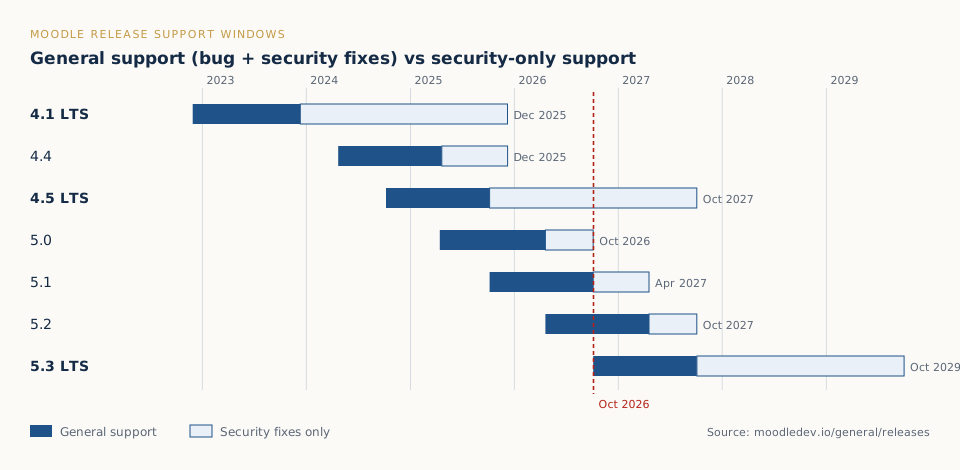
| Version on your site | Security support ends | Status in Oct 2026 |
|---|---|---|
| 4.1 LTS and older | 8 Dec 2025 | Unsupported |
| 4.2, 4.3, 4.4 | Oct 2024 – Dec 2025 | Unsupported |
| 4.5 LTS | 4 Oct 2027 | Security fixes only |
| 5.0 | 5 Oct 2026 | Unsupported |
| 5.1 | 19 Apr 2027 | Security fixes only |
| 5.2 | 4 Oct 2027 | Supported |
| 5.3 LTS | 1 Oct 2029 | Recommended target |
Not sure which version you run? Our free Moodle version checker reads it from public files in a few seconds, with no login.
Which upgrade path do you need?
Moodle only upgrades from a minimum starting version. Moodle 5.2 and 5.3 require the site to be on Moodle 4.4 or later before the upgrade runs. That single rule decides how much work your upgrade involves.
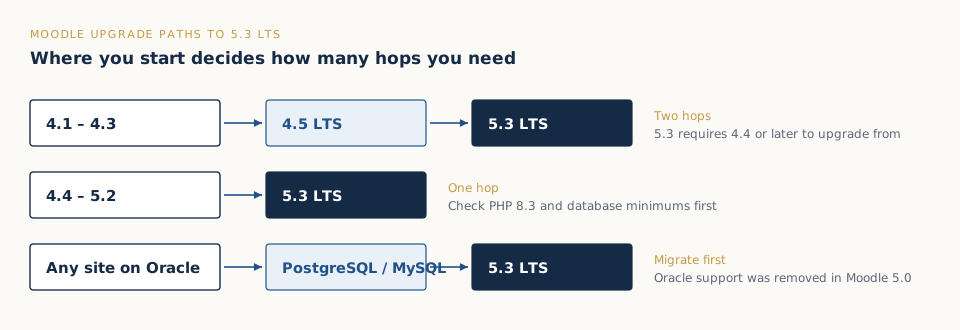
From Moodle 4.1, 4.2 or 4.3
Two hops: first to 4.5 LTS, then to 5.3 LTS. Each hop runs Moodle’s database upgrade steps, and the PHP requirement changes between them (4.5 needs PHP 8.1; 5.3 needs PHP 8.3), so the server usually changes during the project. We run both hops on staging and you see one test report for the end state.
From Moodle 4.4, 4.5, 5.0, 5.1 or 5.2
One hop, directly to 5.3 LTS, provided the server meets the new requirements: PHP 8.3 or 8.4, and a supported database version. Most of the effort goes into the plugins and the theme, not Moodle core.
Any site on Oracle
Oracle support was removed in Moodle 5.0. The database has to be migrated to PostgreSQL or MySQL/MariaDB before a 5.x upgrade. We treat this as a Complex/Rescue engagement because the data migration needs its own verification.
What usually breaks in a Moodle 5.x upgrade
Moodle core upgrades are well tested. Problems almost always come from what sits around core:
- The new
/publicdirectory. From Moodle 5.1, web-accessible files live in apublicfolder and the web server’s document root must point to it. Sites that skip this step see directory listings or errors after upgrading. - Plugins installed in the old locations. Plugins have to sit inside the new structure and be replaced with versions built for the target release. Abandoned plugins with no 5.x build must be replaced or retired.
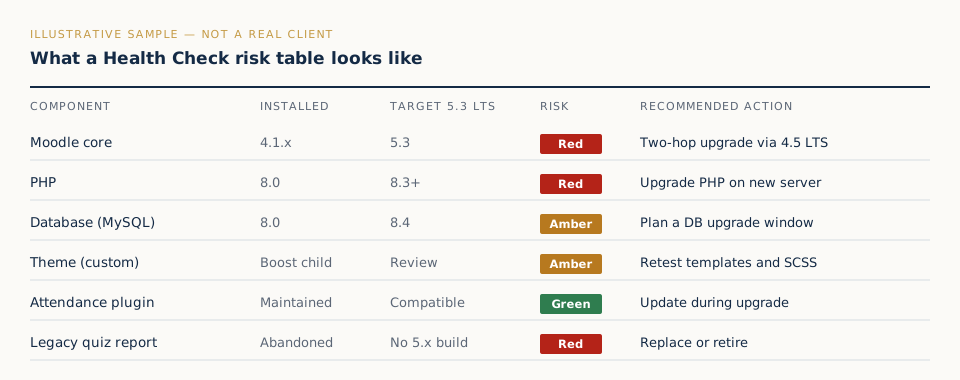
- Custom themes. Child themes of Boost generally survive with template and SCSS fixes. Classic-based themes need more work, because Moodle has removed the Classic theme from core.
- PHP and database versions. PHP 8.3 is required for 5.2 and 5.3, and database minimums have risen (for example MySQL 8.4). Older servers often need replacing rather than patching.
- Local customisations. Core code edits made years ago (“core hacks”) are overwritten by an upgrade. We find them by comparing your code with stock Moodle before anything changes.
How a UTSL upgrade runs
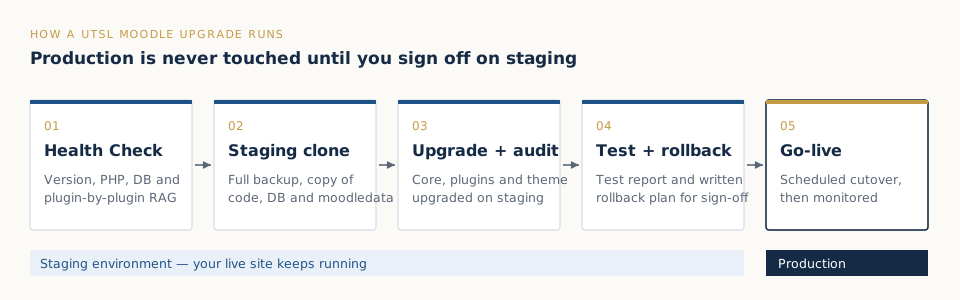
- Health Check ($390, 5 working days). We record the exact version, PHP, database, theme and every installed plugin, then rate each one red, amber or green against the target release. You get a fixed price for your site. The fee is credited in full if you go ahead.
- Staging clone. A full backup and a copy of the code, database and
moodledataon a separate environment. - Upgrade and audit on staging. Core, plugins and theme are upgraded together. Anything that fails is fixed, replaced or flagged for your decision.
- Test report and rollback plan. We test logins, enrolment, course pages, quizzes, assignments, grades and your critical plugins, and write down exactly how we would roll back at cutover.
- Go-live. A scheduled cutover in a window you choose (outside exam periods), followed by monitoring. If something goes wrong at cutover, we roll back rather than leave you on a broken site.
How much does a Moodle upgrade cost?
UTSL publishes fixed prices rather than hourly estimates, so you know the cost before work starts:
| Engagement | Price | Fits |
|---|---|---|
| Moodle Health Check | $390 | Any site. Report in 5 working days, credited to the upgrade. |
| Standard upgrade | $2,400 | One site to the current LTS, up to 30 plugins, staging copy, rollback plan and test report. 2–3 weeks. |
| Complex / rescue upgrade | from $4,800 | Oracle migration, heavy customisation, two-hop upgrades with many plugins, or a failed earlier attempt. |
Payment is 50% upfront and 50% at go-live. If the work turns out to be bigger than the Health Check showed, we agree a revised fixed price before doing the extra work. After go-live, a Moodle Care Plan keeps the site patched so the next upgrade is smaller.
Pre-upgrade checklist for your team
- Pick a go-live window away from enrolment peaks and exam periods.
- List the plugins and integrations the business cannot run without (SSO, payment, video, proctoring, SIS sync).
- Confirm who can approve the staging test report on your side.
- Check hosting: can the server run PHP 8.3 and the required database version, or does it need replacing?
- Tell staff and learners about the maintenance window a week in advance.
Moodle upgrade FAQ
How much does a Moodle upgrade cost?
A standard single-site upgrade to the current LTS is a fixed $2,400. Complex or rescue upgrades, such as migrating off Oracle, heavy custom code or a failed earlier attempt, start from $4,800. A $390 Health Check gives a firm price for your site and is credited in full if you go ahead.
Which Moodle version should we upgrade to in 2026?
Moodle 5.3 LTS, released on 5 October 2026 and supported with security fixes until 1 October 2029. Moving to the LTS means the next forced upgrade is roughly three years away.
Can we upgrade from Moodle 4.1 directly to 5.3?
No. Moodle 5.3 can only be installed as an upgrade from Moodle 4.4 or later. A 4.1, 4.2 or 4.3 site goes to 4.5 LTS first and then to 5.3. We run both steps on staging and deliver one test report.
How long does a Moodle upgrade take?
A standard single-site upgrade typically takes 2–3 weeks from signed agreement and staging access: about a week for backup, staging and the plugin audit, a week for the upgrade and testing, and time for your review before go-live. Actual downtime at cutover is usually a few hours.
Will the upgrade break our site or our plugins?
All work happens on a staging clone first, never directly on production. Every plugin is checked against the target version before the upgrade. Compatible plugins are updated, and unmaintained ones are flagged so you can decide whether to replace, disable or budget for them. A written rollback plan is agreed before go-live.
What is the Moodle 5.1 public folder change?
From Moodle 5.1, all web-accessible files sit in a new public directory and the web server’s document root must point to it. Plugins and server configuration have to be adjusted, or the site shows errors or directory listings after the upgrade. We handle this as part of every 5.x upgrade.
We are on Oracle. Can we still upgrade?
Yes, but Oracle support was removed in Moodle 5.0, so the database must first be migrated to PostgreSQL or MySQL/MariaDB. That is a Complex/Rescue engagement, from $4,800.
Why fixed price instead of hourly?
So you know the cost before we start and there is no incentive on our side to take longer. If a site turns out more complex than the Health Check showed, we agree a revised fixed price before doing extra work. You never get a surprise invoice.
Find out exactly what your upgrade involves.
Start with a $390 Moodle Health Check: a plugin-by-plugin compatibility report and a fixed upgrade price, delivered in 5 working days and credited in full if you upgrade with us.