
Moodle Care Plans: ongoing support that doesn’t depend on one person.
Monthly security patching, verified backups, monitoring and a bank of support hours for self-hosted Moodle. Three fixed tiers, from $290 a month, billed in advance with no hourly invoices.
Essential $290/moManaged $590/moPriority $1,290/mo
A Moodle Care Plan is a fixed monthly maintenance contract. UTSL applies Moodle security releases, checks that backups actually restore, watches uptime and scheduled tasks, and gives you a bank of support hours for fixes and changes. Essential is $290/month with 3 hours; Managed is $590/month and adds hosting for up to about 2,000 users; Priority is $1,290/month with 15 hours and a 4-hour response target.
Compare Care Plan tiers
Every tier includes security patching, backup checks and monitoring. Tiers differ in support hours, hosting and response time.
| Essential $290/mo | Managed $590/mo | Priority $1,290/mo | |
|---|---|---|---|
| Moodle security patches | Included | Included | Included |
| Backup checks & monitoring | Included | Included | Included |
| Support hours per month | 3 hours | 6 hours | 15 hours |
| Hosting (up to ~2,000 users) | — | Included | Included |
| Minor upgrades | — | Included | Included |
| Response time target | Next business day | Next business day | 4 hours |
| Quarterly roadmap call | — | — | Included |
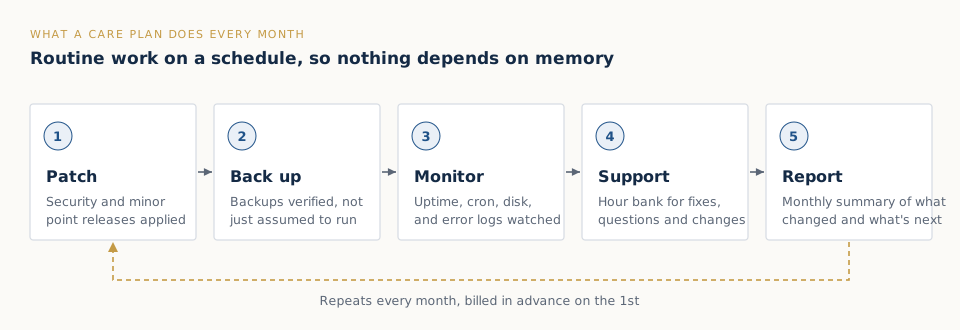
Billed monthly in advance on the 1st. Hours beyond the plan are quoted before we use them, never billed as a surprise.
Why Moodle needs ongoing maintenance
Moodle HQ publishes security fixes on a regular schedule for every supported release. Each one needs applying, testing and checking against your plugins. Most institutions also rely on things that fail quietly: the cron job that sends notifications and closes quizzes, the backup that nobody has tried to restore, the disk that fills up with old course backups at the end of term.
On many campuses, all of that sits with one administrator who also has another job. When they are on leave, nothing gets patched. A Care Plan turns that knowledge into a written, repeatable monthly routine run by a team.
What happens every month
Security patching
We apply Moodle’s point releases and security fixes for your branch, update plugins that publish security releases, and check that critical workflows still work afterwards.
Backup verification
A backup you have never restored is a hope, not a backup. We check that the database and moodledata backups exist, are recent and can be restored.
Monitoring
Uptime, scheduled tasks (cron), disk space and error logs. Problems that usually appear as a flood of tickets on the first day of term get caught before learners see them.
Support hours
Your monthly hour bank covers fixes, configuration changes, plugin questions, small enhancements and “why is this quiz behaving like that?” investigations. If a request needs more hours, we quote it first.
Managed hosting (Managed and Priority)
On the Managed and Priority tiers we also host the site for up to around 2,000 users and handle minor upgrades, so one team owns the whole stack.
Which tier fits?
- Essential ($290/month) suits sites with in-house hosting and an IT team that wants Moodle-specific cover: patching, monitoring and a few hours for the questions only a Moodle specialist can answer.
- Managed ($590/month) suits training providers and smaller institutions that want hosting, maintenance and minor upgrades in one fixed monthly cost.
- Priority ($1,290/month) suits sites where downtime costs revenue or teaching time, such as certification bodies running exams or universities in assessment season. It has 15 hours a month, a 4-hour response target and a quarterly roadmap call.
Not sure? A $390 Health Check shows what state your site is in and what level of care it actually needs.
After an upgrade
Most Care Plans start straight after a Moodle upgrade. The site is on a supported release, the plugin inventory is documented, and the rollback plan becomes the starting point for your runbook. Keeping it patched month by month also makes the next major upgrade smaller and cheaper.
What a Care Plan doesn’t cover
Major version upgrades (for example 4.5 to 5.3), new custom plugins and headless front-ends are projects with their own fixed price. Care Plan hours can be used towards small pieces of that work, and we tell you upfront when a request is project-sized.
Sound familiar?
“I’m the only one who knows how Moodle works here. If I’m off, nothing gets fixed.”
“Every term starts with a flood of tickets about slow pages and broken quizzes.”
“We think the backups run. Nobody has ever tried to restore one.”
Moodle support plan FAQ
How much does Moodle support cost per month?
UTSL Care Plans are $290/month (Essential: patching, monitoring, backup checks and 3 support hours), $590/month (Managed: adds hosting for up to about 2,000 users, 6 hours and minor upgrades) or $1,290/month (Priority: 15 hours, a 4-hour response target and a quarterly roadmap call).
Do you offer ongoing support after an upgrade?
Yes. Most Care Plans start straight after an upgrade, so the site stays on a supported, patched release and the next major upgrade is smaller.
Can you support a Moodle site hosted by someone else?
Yes. The Essential tier works with your existing hosting, whether that is your own data centre, AWS, Azure or a hosting company, provided we have the server and Moodle admin access the work needs. Managed and Priority include hosting by us for up to about 2,000 users.
What happens to unused support hours?
Support hours are a monthly allowance sized to your tier. If you regularly use fewer or more, we’ll suggest moving tiers so you only pay for what you need.
Can we pay hourly instead?
We don’t quote hourly to end clients, because it removes the price certainty that fixed pricing gives you. A Care Plan’s monthly hour bank is the closest fit for flexible ongoing support.
What are your payment terms?
Care Plans are billed monthly in advance on the 1st. Projects such as upgrades are 50% upfront and 50% at go-live. We don’t discount below list price, but we can adjust scope to fit a budget.
Not sure which tier fits?
Start with a Health Check so we can see what your site actually needs before recommending a plan, or talk it through with us first.