
Moodle Health Check
A written, plugin-by-plugin review of your Moodle site that shows what is safe, what is at risk and what an upgrade will really cost, before you commit to one.
$390 fixed priceReport in 5 working daysCredited in full if you upgrade with us
Updated 8 October 2026 · Checked against Moodle 5.3 LTS
A UTSL Moodle Health Check is a $390 review of one self-hosted Moodle site. We check Moodle core, PHP, the database, the theme and every additional plugin against the current long-term support release, rate each one red, amber or green, and send a written report with recommended actions and a fixed upgrade price within 5 working days of receiving access. If you then upgrade with UTSL, the full $390 is credited against the upgrade.
What you get: a red, amber, green report on everything installed
Most Moodle upgrades go wrong because of what sits around core: a plugin nobody maintains any more, a theme built for an older release, a PHP version the new release will not run on. The Health Check finds these before they cost you a weekend.
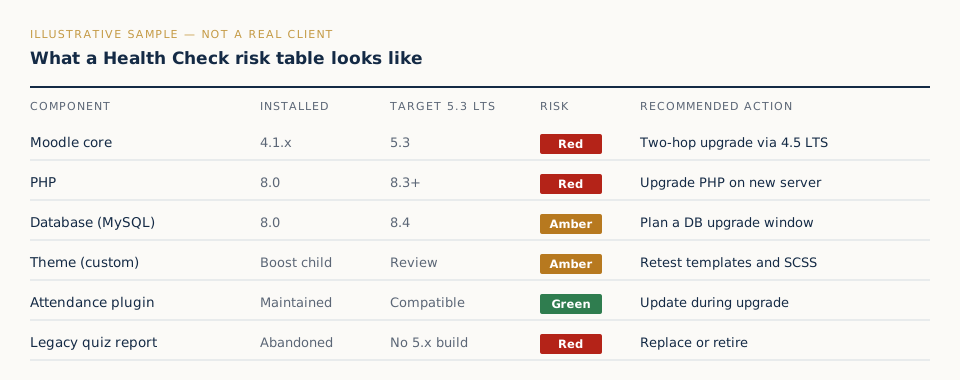
- Moodle core: your exact version and branch, when its security support ends, and the upgrade path to the current LTS (direct, or two steps via 4.5 LTS).
- Server stack: PHP and database versions against what the target release needs. Moodle 5.2 and 5.3 need PHP 8.3, Oracle is no longer supported from 5.0, and 5.1 moved web files into a
/publicdirectory. - Every additional plugin: installed version, whether a release exists for the target Moodle version, whether it is still maintained, and what to do: keep, update, replace or remove.
- Your theme: whether it will survive the upgrade, needs changes, or should be rebuilt on Boost.
- A fixed upgrade price: what the upgrade will cost and how long it will take, based on what we actually found.
What the colours mean
| Rating | Meaning | Typical action |
|---|---|---|
| Green | Ready for the target release | None, or update during the upgrade |
| Amber | Works, but needs an update, a setting change or careful testing | Update or test on staging |
| Red | Blocks the upgrade, is unmaintained or has no compatible release | Replace, remove or custom fix |
The deliverable and the timeline
You get a written report within 5 working days of us receiving working access. The clock starts when access is confirmed, not when you first get in touch. The report contains the full risk table, a short summary for whoever signs off the budget, the recommended upgrade path and a fixed price for doing it. If you want to go through it together, we’ll walk you through it on a free call.
Price: $390, credited in full if you upgrade with us
The Health Check costs $390 per Moodle site. If you go ahead with an upgrade from UTSL, the whole $390 is credited against the upgrade price. On a standard $2,400 upgrade you would pay $2,010 more, so the Health Check has cost you nothing extra.
If the upgrade turns out bigger than the Health Check showed, we agree a revised fixed price in writing before doing any extra work. See all published prices on the pricing page.
How it works
Request
Send the form with your site address. We reply within one working day and explain the access we need.
We scan
We review core, server stack, theme and every plugin against the target release. We only look; nothing on your site is changed.
You get the report
The red, amber, green table, recommended actions, the upgrade path and a fixed upgrade price.
Who it is for
Administrators of self-hosted Moodle, on any version, who need to know where they stand before they plan or budget an upgrade.
IT and VLE managers
At universities, colleges and schools, who need a defensible upgrade plan and price for a budget holder.
Training providers and academies
Running Moodle for customers or staff, who cannot afford a broken site in the middle of a course.
Agencies inheriting a site
Taking over a client’s Moodle with no documentation, who need to know what they have been handed.
Sites that tried and failed
If an earlier upgrade attempt was rolled back, the Health Check finds out why before the next attempt.
On MoodleCloud or a fully managed hosting plan? Your host usually runs upgrades for you, so this check is less useful. Not sure what version you run? The free version checker tells you in seconds.
Why ask UTSL
Independent
UTSL is an independent Moodle upgrade and care company. The report recommends what your site needs, including when the right answer is to remove a plugin rather than add one.
We reply ourselves
No sales queue and no account managers. The engineers who review your site answer your questions, within one working day.
Prices in public
The Health Check, upgrades and Care Plans all have published prices, and the report is yours to keep whoever you hire next.
Moodle Health Check FAQ
What access do you need?
A temporary Moodle site administrator account. That lets us read the plugins overview, environment, notifications and system status pages, which cover most of the report. We don’t need a copy of your database. If something can only be confirmed on the server, such as a PHP extension or a customised core file, we list it in the report as an open question rather than guess.
Is it safe to give you access?
Yes. The Health Check is read-only: we don’t install anything, change settings, run upgrades or export user data. We recommend creating a dedicated account for us and suspending it as soon as the report arrives. Moodle records what the account views in its own logs, so you can check.
What if we decide not to upgrade with you?
That’s fine. The report is yours to keep and use with your own team or another provider. The $390 credit only applies if you upgrade with UTSL.
Does our site need to be on a recent version?
No. We review self-hosted Moodle on any version, including old 3.x sites that need more than one upgrade step to reach the current LTS.
How is this different from the free version checker?
The version checker reads public files from outside your site and tells you the major version and its support status. The Health Check looks from inside, as an administrator, at every plugin, the theme and the server stack, and ends with a fixed upgrade price.
How long does it take?
5 working days from when we have working access to the written report.
Find out where your Moodle stands
$390, a written report in 5 working days, and the full fee credited if you upgrade with us.
- Every plugin and the theme rated red, amber or green
- PHP, database and upgrade path checked against Moodle 5.3 LTS
- A fixed price for the upgrade, in writing